CI/CD Pipeline Architecture
The Pipeline

Figure 1. Build Pipeline
The pipeline is architected into eight distinct stages to provide clear separation of concerns. This ensures that if a build fails during Stage 4 (Static Analysis), the subsequent containerisation and deployment stages are blocked, preserving the integrity of the production environment.
🚀 CI/CD Pipeline
This project utilizes a fully automated Declarative Jenkins Pipeline to manage the lifecycle of the Guitar Store API.
| Status | Stage | Description |
|---|---|---|
| ✅ | CI | Maven Build, JUnit Testing, & SonarCloud Analysis |
| ✅ | CD | Docker Hub Delivery & Ansible Orchestration |
| 🌐 | Live | Automated Deployment to AWS EC2 |
Pipeline Stages
Stage 1: Compile (Bitbucket & Maven)
Jenkins monitors the Bitbucket repository and pulls the latest source code from the cbd-ca2 branch upon detecting a commit. Maven then validates the project structure and compiles the Java 21 source code to ensure the application is syntactically correct before testing.
Configuration: Source Code Management (SCM) uses the Bitbucket repository URL with the branch specifier */cbd-ca2.
Stage 2: Test (JUnit & Karate)
The pipeline executes a suite of 43 automated tests, including JUnit for internal business logic and Karate for BDD-style API integration. The pipeline is configured with a "fail-fast" logic; if any test fails, the build stops immediately to prevent broken code from reaching production.
Configuration: Maven goal mvn test is used, with results parsed by the Jenkins JUnit plugin from the target/surefire-reports directory.
Stage 3: Package (Maven)
Once verified by tests, Maven packages the compiled code into a single, executable .jar file. This creates a portable artifact containing the entire Spring Boot application, ready for containerisation.
Configuration: The mvn package -DskipTests -Dcheckstyle.skip command generates guitar-store-api-0.0.1-SNAPSHOT.jar in the target folder.
Stage 4: Static Analysis (SonarCloud & Checkstyle)
This stage implements Continuous Inspection by triggering a SonarScanner process. The code is uploaded to SonarCloud to check for bugs, vulnerabilities, and "code smells," while Checkstyle enforces strict formatting standards.
Configuration: Uses the sonar:sonar goal with a secure authentication token stored in Jenkins Credentials.
Stage 5: Containerisation (Docker)
A multi-stage Docker build packages the JAR into a slim, production-ready image using a JRE-only base to minimize the security attack surface. A trial run is performed within the pipeline as a "smoke test" to ensure the container is responsive before delivery.
Configuration: Executes a batch command: docker build -t joe0regan/guitar-store-api:latest ..
Stage 6: Artifact Delivery (Docker Hub)
The verified Docker image is tagged and pushed to a central repository on Docker Hub. This transforms the image into an immutable artifact that can be pulled by any authorized server in the network.
Configuration: Uses docker login with masked Jenkins credentials (DOCKER_USER, DOCKER_PASS) followed by docker push.
Stage 7: Ansible Configuration
Jenkins securely transmits the deployment blueprints—specifically the Ansible Playbook (deploy-guitar-api.yml) and the Dockerfile—to the Ansible Control Node via SSH. This decouples the build environment from the deployment orchestration logic.
Configuration: The "Publish over SSH" plugin transfers files to /opt/docker on the Ansible EC2 instance using the ansadmin service user.
Stage 8: Deployment (AWS EC2)
The final stage triggers the automated deployment on the target AWS Docker Host. Jenkins sends a remote command to Ansible, which executes a "Stop, Remove, Pull, and Run" sequence to ensure the latest version of the API is live on port 8080.
Configuration: Exec command: ansible-playbook -i /etc/ansible/hosts /opt/docker/deploy-guitar-api.yml.
Detailed Diagram
Jenkins Pipeline
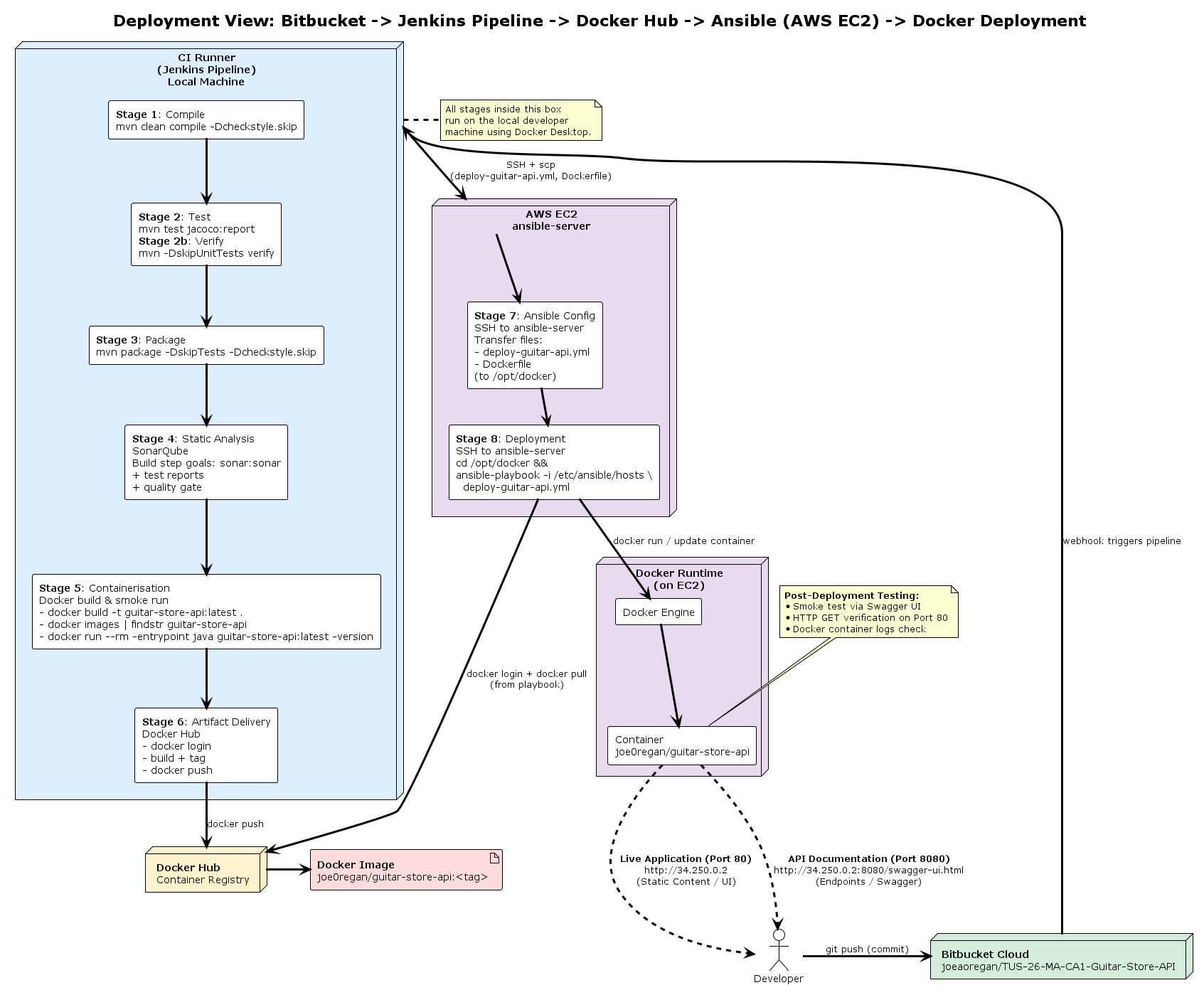
Figure 2. Detailed Jenkins Pipeline Diagram
GitHub Actions Pipeline
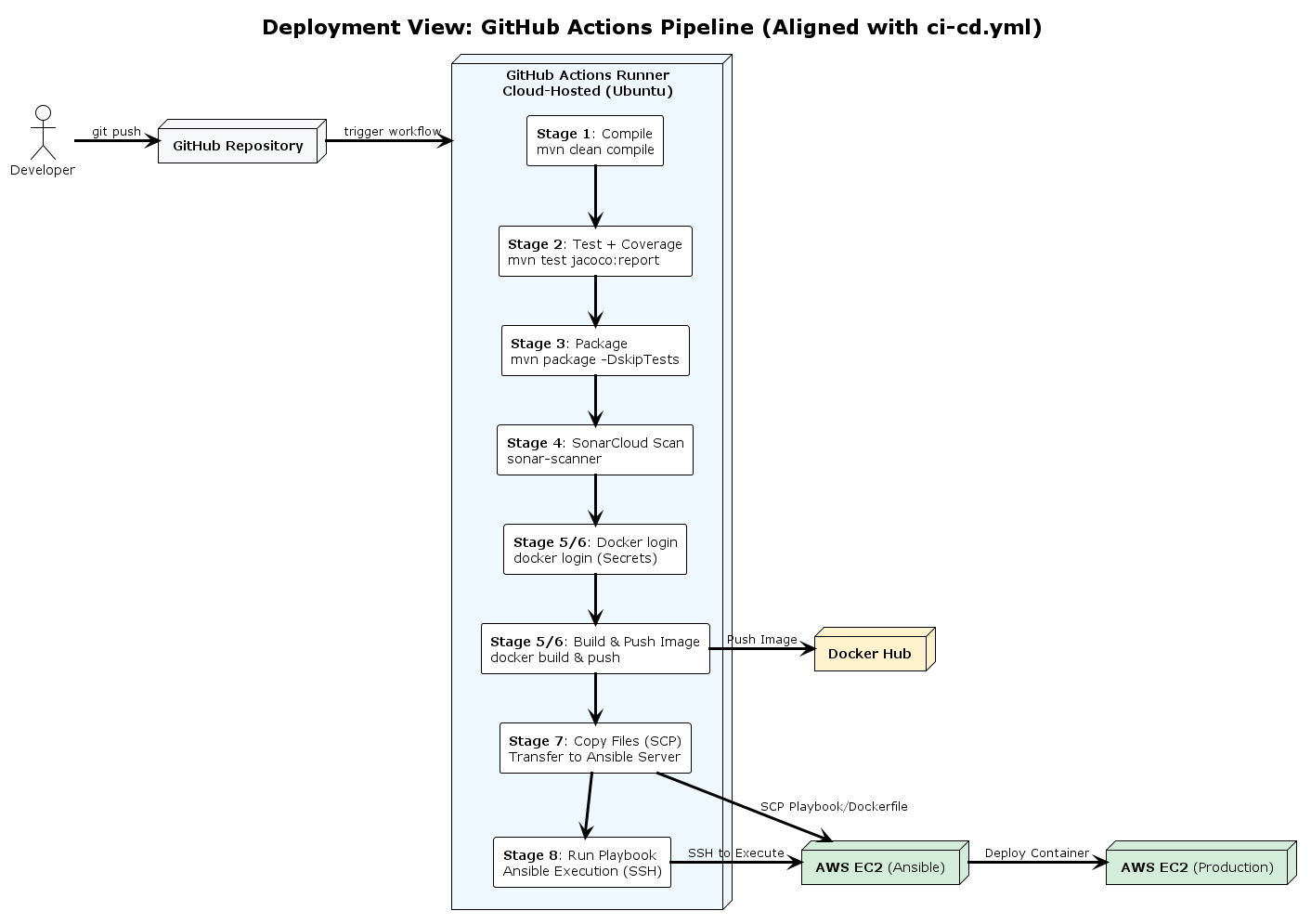
Figure 3. Detailed GitHub Actions Pipeline Diagram