Skip to content

RESTful API Lab 5

Steps and Files Used

  1. Check Customer Exists
    • repository/AccountsRepository.java
  2. ResourceNotFoundException
    • exception/ResourceNotFoundException.java
  3. GlobalLogicExceptionHandler
    • exception/GlobalLogicExceptionHandler.java
  4. CustomerDto Account Info
    • dto/CustomerDto.java
  5. Controller Read API
    • controller/AccountsController.java
  6. fetchAccount()
    • service/IAccountService.java
    • service/impl/AccountServiceImpl.java
  7. Test in Postman
    • Test using Postman

Lab#5 Implementing a READ API that fetches the details based on mobile number.


In this lab we are going to fetch the customer and account details based on the customers mobile number. We will find the customer object base on the mobile number. Then we will find the account based on the customer id. The account data is returned as part of the CustomerDto object. The case where a customer does not exist is handled with exceptions.

1. Check Customer Exists

First we need to add a check to see if customer already exists. Add the method findByCustomerId in AccountsRepository interface.

AccountsRepository.java
1
2
3
4
5
6
7
8
9
@Repository
public interface AccountsRepository extends JpaRepository<Accounts, Long> {

    Optional<Accounts> findByCustomerId(Long customerId);

    @Transactional
    @Modifying
    void deleteByCustomerId(Long customerId);
}

2. ResourceNotFoundException

Add a new ResourceNotFoundException the com.tus.accounts.exception package.

ResourceNotFoundException.java
 1
 2
 3
 4
 5
 6
 7
 8
 9
10
11
12
13
package com.tus.accounts.exception;

import org.springframework.http.HttpStatus;
import org.springframework.web.bind.annotation.ResponseStatus;

@ResponseStatus(value = HttpStatus.NOT_FOUND)
public class ResourceNotFoundException extends RuntimeException {
    private static final long serialVersionUID = 1L;

    public ResourceNotFoundException(String resourceName, String fieldName, String fieldValue) {
        super(String.format("%s not found with the given input data %s : '%s'", resourceName, fieldName, fieldValue));
    }
}

3. GlobalLogicExceptionHandler

Update GlobalLogicExceptionHandler to handle the exception and return an appropriate ErrorResponseDto.

GlobalLogicExceptionHandler.java
25
26
27
28
29
30
31
32
33
34
35
@ExceptionHandler(ResourceNotFoundException.class)
public ResponseEntity<ErrorResponseDto> handleResourceNotFoundExceptoin(ResourceNotFoundException exception,
        WebRequest webRequest) {
    ErrorResponseDto errorResponseDTO = new ErrorResponseDto(
        webRequest.getDescription(false), 
        HttpStatus.NOT_FOUND,
        exception.getMessage(), 
        LocalDateTime.now()
    );
    return new ResponseEntity<>(errorResponseDTO, HttpStatus.NOT_FOUND);
}

4. CustomerDto Account Info

Update the CustomerDto to add a new field to keep the account information. We could create a new Dto for the combined Customer and Account information but will leave like this for now.

CustomerDto.java
 1
 2
 3
 4
 5
 6
 7
 8
 9
10
11
12
13
14
15
package com.tus.accounts.dto;

import lombok.Data;

@Data
public class CustomerDto {

    private String name;

    private String email;

    private String mobileNumber;

    private AccountsDto accountsDto;
}

5. Controller Read API

Add a new method to the controller class for the read API.

AccountsController.java fetchAccountDetails()
1
2
3
4
5
6
@GetMapping("/account")
public ResponseEntity<CustomerDto> fetchAccountDetails(
        @RequestParam String mobileNumber) {
    CustomerDto customerDto = iAccountService.fetchAccount(mobileNumber);
    return ResponseEntity.status(HttpStatus.OK).body(customerDto);
}

6. fetchAccount

Implement the fetchAccount method by adding to the Service Interface and the implementation class. This uses Lambda expressions to throw the exception.

IAccountService.java
3
4
5
6
7
8
import com.tus.accounts.dto.CustomerDto;

public interface IAccountsService {
    void createAccount(CustomerDto customerDto);
    CustomerDto fetchAccount(String mobileNumber);
}
AccountServiceImpl.java fetchAccount()
 1
 2
 3
 4
 5
 6
 7
 8
 9
10
11
@Override
    public CustomerDto fetchAccount(String mobileNumber) {
        Customer customer = customerRepository.findByMobileNumber(mobileNumber).orElseThrow(
            () -> new ResourceNotFoundException("Customer", "mobileNumber", mobileNumber)
        );
        Accounts accounts = accountsRepository.findByCustomerId(customer.getCustomerId()).orElseThrow(
            () -> new ResourceNotFoundException("Account", "customerId", customer.getCustomerId().toString()));
        CustomerDto customerDto = CustomerMapper.mapToCustomerDto(customer, new CustomerDto());
        customerDto.setAccountsDto(AccountsMapper.mapToAccountsDto(accounts, new AccountsDto()));
        return customerDto;
    }

7. Test in Postman

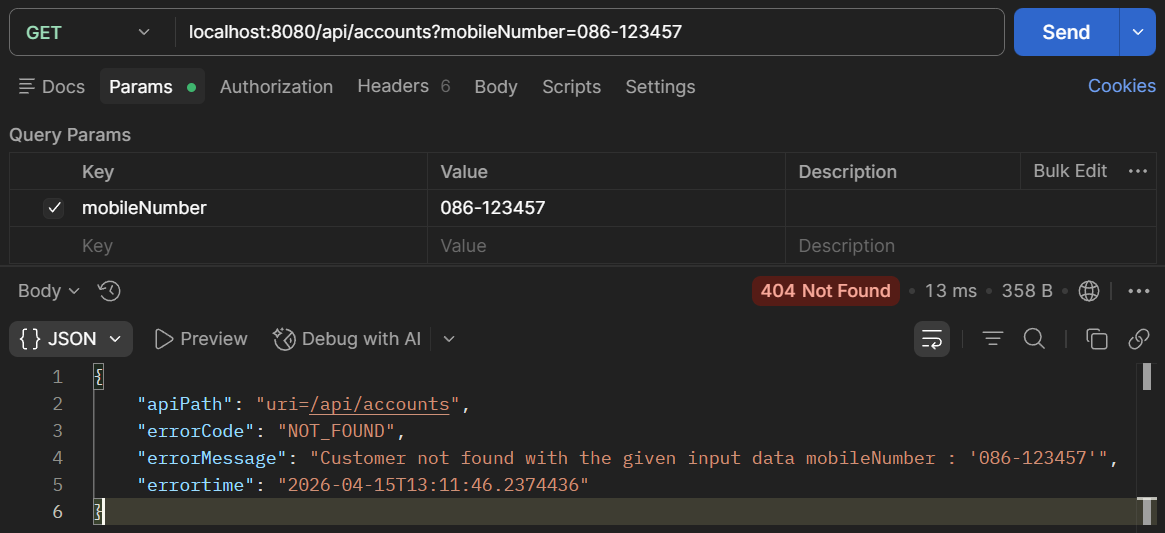
Test the Application. Add a customer and then fetch the details as shown. Then use a different phone number and check that the 404 response with appropriate error message is found.
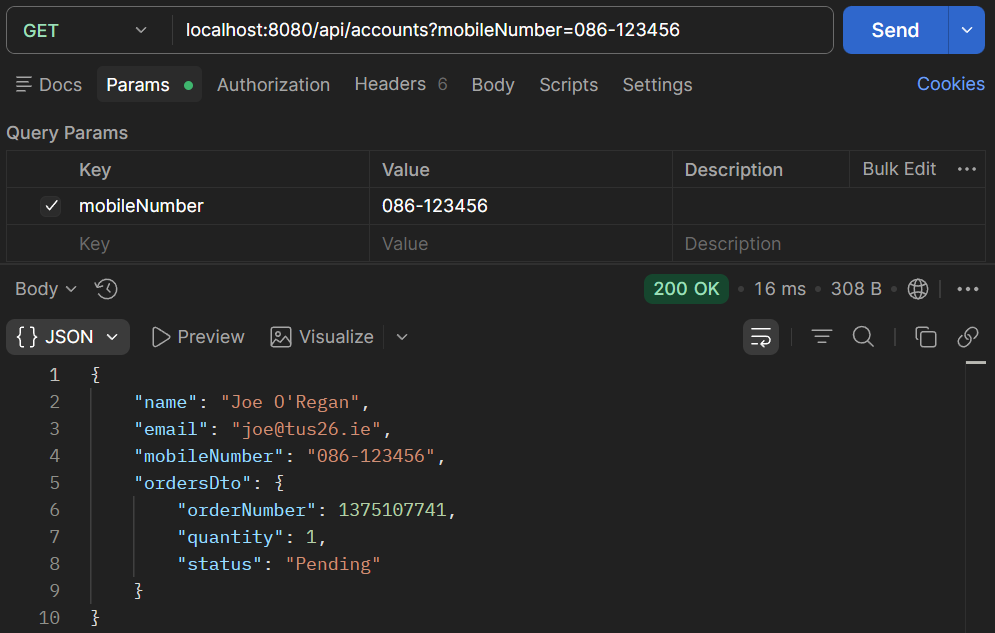
Test customer found

Figure 1. Test customer found.

Test customer not found

Figure 2. Test customer not found.