Lab 10
Steps and Files
- application.yml Build Version
- application.yml
- @Value Annotation
- controller/AccountController.java
- @AllArgsConstructor
- controller/AccountController.java
- Test
- Test using Postman
Lab#10 Configuration with Springboot alone
In this lab we will read configurations using Springboot with @Value annotation in the accounts microservice. We add in a build property in the .yml file.
Order of precedence
Spring Boot uses a very particular order that is
designed to allow sensible overriding of values.
Properties are considered in the following order
(with values form lower items overriding earlier ones):

- Properties present inside files like application.properties
- OS Environmental variables
- Java System properties (System.getProperties())
- JNDI attributes from java:comp/env
- ServletContext init parameters
- ServletConfig init parameters
- Command line arguments
1. application.yml Build Version
Add property to the application.yml
server:
  port: 8081
spring:
  datasource:
    url: jdbc:h2:mem:testdb
    driverClassName: org.h2.Driver
    username: sa
    password: ''
  h2:
    console:
      enabled: true
  jpa:
    database-platform: org.hibernate.dialect.H2Dialect
    hibernate:
      ddl-auto: update
    show-sql: true
build:
  version: "3.0"
Step 1: Add a property to the application.properties of the accounts microservice as shown above.
2. @Value Annotation
Step #2 Build a REST API to read the property and return to user. In the AccountController using the @Value annotation
Add property with @Value annotation in the AccountController
@Validated
public class AccountController {

    private IAccountsService iAccountsService;

    @Value("${build.version}")
    private String buildVersion;

    @PostMapping("/account")
    public ResponseEntity<ResponseDto> createAccount(@Valid @RequestBody CustomerDto customerDto) {
        iAccountsService.createAccount(customerDto);
        return ResponseEntity.status(HttpStatus.CREATED)
                .body(new ResponseDto(AccountsConstants.STATUS_201, AccountsConstants.MESSAGE_201));
    }
Add rest end point to return the property value
@GetMapping("/build-info")
    public ResponseEntity<String> getBuildInfo() {
        return ResponseEntity
        .status(HttpStatus.OK)
        .body(buildVersion);
    }
3. @AllArgsConstructor
Step #3 We also need to remove the @AllArgsConstructor and include a single argument constructor.
Changing @AllArgsConstructor to single arg constructor
@RestController
@RequestMapping(path = "/api", produces = MediaType.APPLICATION_JSON_VALUE)
//@AllArgsConstructor
@Validated
public class AccountController {

    private IAccountsService iAccountsService;

    public AccountController(IAccountsService iAccountsService) {
        this.iAccountsService = iAccountsService;
    }

    @Value("${build.version}")
    private String buildVersion;
4. Test
Step 4: Test using Postman
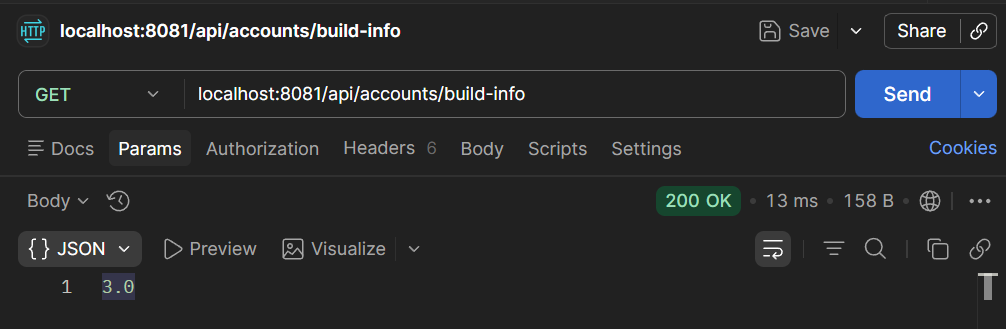
Figure 1: Test using Postman