Lab 24
Steps and Files
- Feign Client Dependency
- pom.xml
- Update AccountsApplication with @EnableFeignClients Annotation
- AccountsApplication.java
- CardsFeignClient Interface
- CardsFeignClient.java
- LoansFeignClient Interface
- LoansFeignClient.java
- CustomerDetailsDto
- CustomerDetailsDto.java
- CustomerController
- CustomerController.java
- ICustomerService Interface
- ICustomerService.java
- Postman: Fetch All Customer Details
Lab#24 Feign Client code changes to invoke other microservices.
In this lab we will add a new endpoint to the accounts service that will accumulate data from the cards and loans services.
1. Feign Client Dependency
Step#1 Add the feign client dependency to the pom file for the accounts microservice.
| Add Feign Client Dependency to pom.xml | |
|---|---|
38 39 40 41 | |
2. Update AccountsApplication with @EnableFeignClients Annotation
Step#2 Update the AccountsApplication class to add the @EnableFeignClients annotation.
package com.tus.accounts;

import org.springframework.boot.SpringApplication;
import org.springframework.boot.autoconfigure.SpringBootApplication;
import org.springframework.boot.context.properties.EnableConfigurationProperties; // Lab 12
import org.springframework.cloud.openfeign.EnableFeignClients; // Lab 24
import org.springframework.data.jpa.repository.config.EnableJpaAuditing; // Lab 7

import com.tus.accounts.dto.AccountsContactInfoDto; // Lab 12

@SpringBootApplication
@EnableFeignClients // Lab 24
@EnableJpaAuditing(auditorAwareRef = "auditAwareImpl") // Lab 7
@EnableConfigurationProperties(value = {AccountsContactInfoDto.class}) // Lab 12
public class AccountsApplication {

    public static void main(String[] args) {
        SpringApplication.run(AccountsApplication.class, args);
    }
}
3. CardsFeignClient Interface
Step#3 Add a new package com.tus.accounts.service.client with an interface called CardsFeignClient and copy the CardsDto from the cards microservice to the Accounts microservice.
package com.tus.accounts.service.client;

import org.springframework.cloud.openfeign.FeignClient;
import org.springframework.http.ResponseEntity;
import org.springframework.web.bind.annotation.GetMapping;
import org.springframework.web.bind.annotation.RequestParam;

import com.tus.accounts.dto.CardsDto;

@FeignClient("cards")
public interface CardsFeignClient {
    @GetMapping(value="/api/cards", consumes="application/json")
    public ResponseEntity<CardsDto> fetchCardDetails(@RequestParam String mobileNumber);
}
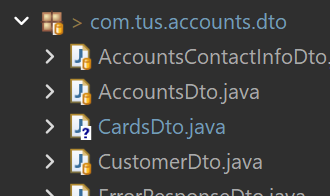
Figure 1. Copy CardsDto From Cards Microservice to Accounts Microservice
4. LoansFeignClient Interface
Step#4 Now add another interface for the LoansFeignClient
package com.tus.accounts.service.client;

import org.springframework.cloud.openfeign.FeignClient;
import org.springframework.http.ResponseEntity;
import org.springframework.web.bind.annotation.GetMapping;
import org.springframework.web.bind.annotation.RequestParam;

import com.tus.accounts.dto.LoansDto;

@FeignClient("loans")
public interface LoansFeignClient {
    @GetMapping(value="/api/loans", consumes="application/json")
    public ResponseEntity<LoansDto> fetchLoanDetails(@RequestParam String mobileNumber);
}
5. CustomerDetailsDto
Step#5 Now we will use the interfaces in the accounts service to fetch data from the loans and cards services and consolidate the data and return it to the user. To hold the information, we will create a new Dto called CustomerDetailsDto that will hold all the information about the customer.
package com.tus.accounts.dto;

import jakarta.validation.constraints.Email;
import jakarta.validation.constraints.NotEmpty;
import jakarta.validation.constraints.Pattern;
import jakarta.validation.constraints.Size;
import lombok.Data;

@Data
public class CustomerDetailsDto {
    @NotEmpty(message = "Name cannot be null or empty")
    @Size(min=5, max=30, message="the length of the customer name should be between 5 and 30")
    private String name;


    @NotEmpty(message = "email address cannot be null or empty")
    @Email(message="Email address should be a valid value")
    private String email;

    @Pattern(regexp = "(^$|[0-9]{10})", message = "Mobile Number must be 10 digits")
    private String mobileNumber;

    private AccountsDto accounts;
    private CardsDto cards;
    private LoansDto loans;
}
6. CustomerController
Step#6 Create a new class CustomerController with a @GetMapping in the accounts microservice.
| CustomerController.java with @GetMapping | |
|---|---|
1 2 3 4 5 6 7 8 9 10 11 12 13 14 15 16 17 18 19 20 21 22 23 24 25 26 27 28 29 30 31 32 | |
7. ICustomerService Interface
Step#7 Create the service interface and its implementation. We need to add a mapper method mapToCustomerDetailsDto in the customerMapper class.
| ICustomersService.java with fetchCustomerDetails method | |
|---|---|
1 2 3 4 5 6 7 8 | |
| CustomersServiceImpl.java | |
|---|---|
1 2 3 4 5 6 7 8 9 10 11 12 13 14 15 16 17 18 19 20 21 22 23 24 25 26 27 28 29 30 31 32 33 34 35 36 37 38 39 40 41 42 43 44 45 46 47 48 49 50 51 | |
| CustomerMapper.java mapToCustomerDetailsDto() method | |
|---|---|
22 23 24 25 26 27 | |
8. Postman: Fetch All Customer Details
Step #8 Make sure you have a customer, a loan and a card all created with the same mobile number. Then in Postman use the customers api to fetch all the details about the customer.
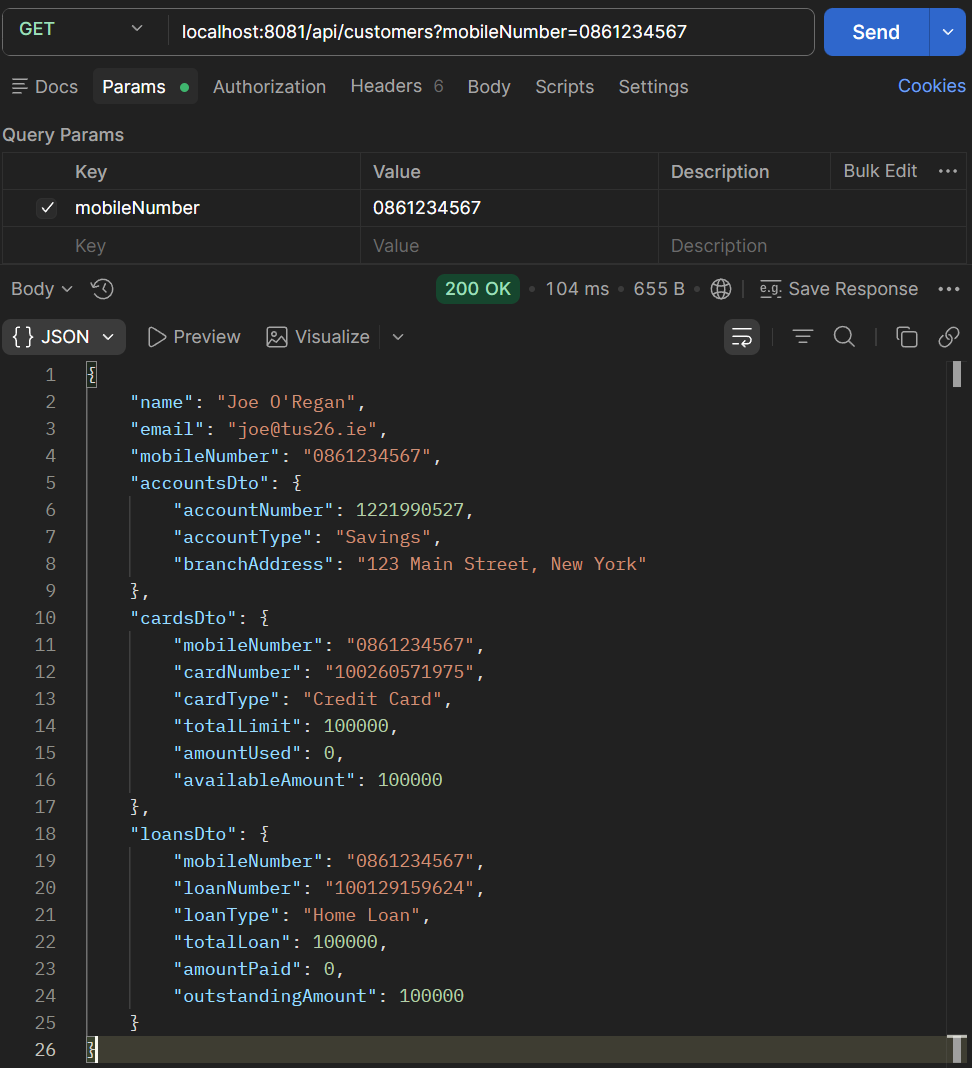
Figure 2. Fetch All Customer Details Using Same Mobile Number
POST Account:
localhost:8081/api/accounts
| JSON body | |
|---|---|
1 2 3 4 5 6 7 8 9 10 | |
GET Account
localhost:8081/api/accounts?mobileNumber=0861234567
POST Card
localhost:9000/api/cards?mobileNumber=0861234567
| JSON body | |
|---|---|
1 2 3 4 5 6 7 8 | |
GET Card
localhost:9000/api/cards?mobileNumber=0861234567
POST Loan
localhost:8090/api/loans?mobileNumber=0861234567
| JSON body | |
|---|---|
1 2 3 4 5 6 7 8 | |
GET Loan
localhost:8090/api/loans?mobileNumber=0861234567
GET Customers
localhost:8081/api/customers?mobileNumber=0861234567